Publishing a blog post is easy. Getting people to read it is much harder.
You can spend hours researching a topic, writing useful content, and designing attractive images. Yet your analytics may show only a handful of visitors. This happens to both new blogs and established websites.
The good news is that blog traffic is not based on luck. It grows through a combination of helpful content, smart planning, and steady improvement. Google still rewards websites that answer users’ questions well, while AI-powered search tools also look for clear, trustworthy, and well-structured content. The core principles remain the same: create useful content, organize it well, and help people find it.
This guide explains how to increase blog traffic using practical techniques that work for technology blogs, WordPress websites, SaaS companies, digital marketers, and small businesses.
By the end of this guide, you will know how to:
- Find topics people already search for.
- Create content readers actually want.
- Improve your blog SEO.
- Build a stronger content structure.
- Promote your articles more effectively.
- Grow steady organic blog traffic over time.
There are no shortcuts or secret formulas. Small improvements made consistently can produce impressive results over time.
- Why Your Blog Isn't Getting Traffic
- How to Increase Blog Traffic: Proven Strategies to Bring More Visitors
- 1. Find Keywords People Actually Search For
- 2. Create Content That Solves Real Problems
- 3. Optimize Every Blog Post for SEO
- 4. Match Search Intent
- 5. Write Better Headlines
- 6. Add Images, Charts, and Videos
- 7. Improve Internal Linking
- 8. Build Topic Clusters
- 9. Add an FAQ Section
- 10. Improve Website Speed
- 11. Make Your Website Mobile-Friendly
- 12. Build High-Quality Backlinks
- 13. Promote Every Blog Post
- 14. Build an Email List
- 15. Update Older Blog Posts
- 16. Repurpose Content
- 17. Track Performance With Google Analytics and Google Search Console
- 18. Publish Consistently
- 19. Optimize for AI Search
- Quick Wins You Can Try This Month
- Final thoughts
- FAQ
Why Your Blog Isn’t Getting Traffic

Seeing very little traffic after publishing several blog posts can feel disappointing. You put time and effort into creating content, but visitors never seem to arrive.
In most cases, there isn’t a single reason behind it. Small issues across your content, SEO, website, or promotion can limit your blog’s visibility. Understanding these problems is the first step toward fixing them.
Once you know what is holding your blog back, you can make smart improvements that help attract more visitors over time.
Weak Keyword Research
Some bloggers write about topics they personally enjoy without checking whether anyone is searching for them.
For example, a technology blog may publish an article about an obscure browser extension that receives almost no monthly searches. Even an excellent article can remain invisible if very few people look for that topic.
Example keywords
- best password managers
- keyword rank tracking tools
- AI image generators
- WordPress backup plugins
Poor Search Intent
People search with a clear goal. Someone searching “best email marketing software” expects product recommendations.
Someone searching “how to create an email newsletter” wants a step-by-step guide.
If your article does not satisfy that goal, visitors leave quickly, and search engines receive signals that your page did not fully answer the query.
Thin Content
A short article that only scratches the surface rarely becomes a trusted resource. Readers prefer guides that explain the topic clearly, answer common questions, include examples, and solve real problems.
For example, an article about WordPress security should explain security risks, recommended plugins, backup practices, and recovery options.
Weak SEO
Helpful content still needs proper optimization. Missing page titles, unclear headings, poor URLs, or unoptimized images can limit your visibility.
Small improvements across every article can gradually increase search performance.
Slow Website
Visitors expect websites to load quickly. If pages take several seconds to appear, some users leave before reading your content.
Large images, slow hosting, excessive plugins, and heavy themes are common reasons.
No Content Promotion
Publishing an article is only the first step. If nobody knows your content exists, traffic will grow very slowly.
Sharing articles through email newsletters, LinkedIn, Facebook, X, Reddit, or industry communities helps new content reach more readers.
Weak Internal Linking
Every article should help readers discover another useful article. Without internal links, visitors may leave after reading a single page.
Strong internal linking also helps search engines understand your website.
Inconsistent Publishing
Publishing regularly builds trust with readers and creates more opportunities to appear in search results.
A simple schedule you can maintain is better than publishing 10 articles in one month and disappearing for the next 3.
How to Increase Blog Traffic: Proven Strategies to Bring More Visitors
Growing blog traffic takes patience, but every improvement builds on the previous one. The following strategies help you attract more visitors, keep them engaged, and encourage them to return.
Start with the basics, measure your progress, and continue improving each part of your website.
1. Find Keywords People Actually Search For

Every successful blog starts with the right topic. If nobody searches for your topic, even the best article may receive very little traffic.
Keyword research helps you discover what your audience wants before you begin writing.
Search Volume
Search volume estimates how frequently people search for a keyword each month. Higher search volume usually means greater traffic potential. However, you will face tough competition from top authority websites and online discussion forums.
New websites should not focus on high-volume keywords. Smaller search terms can also attract steady visitors and are easier to rank for.
Examples
- best AI writing tools for content creators
- WordPress speed optimization tips for beginners
- email marketing software for startups
- keyword rank tracking tools for small-scale businesses
Keyword Difficulty
Keyword difficulty estimates how competitive a search term is. Large brands usually dominate broad keywords such as “Instagram marketing” and “social media management tools.”
New blogs can make faster progress by targeting lower-competition keywords. As your website grows, you can gradually target broader topics.
Examples
- free screen recording software
- SEO audit checklist
- AI meeting assistants
- website uptime monitoring tools
Long-Tail Keywords
Long-tail keywords are longer and more specific search phrases. They usually describe exactly what someone wants to find.
While they may receive fewer searches than broad keywords, they can attract highly targeted visitors seeking a clear answer. These keywords also tend to face less competition, making them a smart choice for new blogs and growing websites that want to attract steady organic traffic.
Examples
- Best keyword rank tracking tools for beginners
- How to speed up a WordPress website
- free AI image generator for marketing
- best CRM software for small businesses
These keywords can bring a few visitors to your pages each month. But they might be targeted visitors, so those visits will most likely convert into sales.
Takeaway:
Keyword research helps you discover topics people already search for. Targeting the right keywords gives your content a better chance of attracting steady, relevant traffic.
2. Create Content That Solves Real Problems
Readers visit blogs because they need answers. When your article solves a problem, visitors stay longer, share your content, and return for future advice.
Always think about the reader before writing.
Ask yourself:
“What problem will this article solve?”
If you cannot answer that question, consider choosing another topic.
Research Your Audience
Learn what your audience is asking. Read discussions on Reddit, Quora, LinkedIn, YouTube comments, Facebook groups, and industry forums.
Repeated questions usually become excellent article ideas.
Examples
- How do I improve website speed?
- Which project management tool should I use?
- How do I remove malware from WordPress?
- Which social media scheduler is best?
Answer Questions Clearly
Do not assume readers already understand technical terms. Explain concepts using simple language.
Guide readers step by step whenever possible. A beginner should feel comfortable following your advice.
A useful article explains the complete process.
Include:
- clear explanations
- practical steps
- useful tips
- common mistakes
- helpful tools
Readers should leave with confidence that they have learned something valuable from your page.
Use Practical Examples
Examples help readers understand ideas much faster. Suppose you recommend using Google Search Console.
Do not simply explain what it does. Show readers how it helps identify pages receiving impressions but very few clicks. That gives them a good opportunity to improve titles and meta descriptions.
Takeaway:
Focus on solving your audience’s problems with clear, practical content. Helpful articles keep readers engaged and encourage them to visit your website again.
3. Optimize Every Blog Post for SEO
Writing a helpful article is only part of the job. Every blog post should also be easy for search engines to understand and simple for readers to navigate.
Small improvements across your page can increase its visibility and bring more visitors in the long term.
Focus on the basics first. A strong title, well-organized headings, clean URL, optimized images, and natural keyword placement can make a noticeable difference without adding extra work.
Write a Strong Title
Your title is one of the first things people notice in search results. A strong and interesting title can encourage more people to click on your article. It should explain what readers will learn while naturally including your primary keyword.
Avoid vague or misleading titles. When your title matches the content, readers know what to expect and are more likely to stay on your page.
Write a Helpful Meta Description
A meta description gives people a quick preview of your article before they visit your website. While it does not directly improve rankings, a clear and engaging description can encourage more clicks from search results.
Summarize the page in one or two sentences, include your primary keyword naturally, and tell readers what they will gain by reading the article. Write it in up to 160 characters, so entire texts will appear in search results.
Example
Discover the best free blogging tools for beginners. Explore writing, SEO, design, keyword research, and analytics tools to grow your blog with ease.
Organize Content With Headings
Headings divide your article into clear, easy-to-read sections. They help readers quickly find the information they need without reading every paragraph.
They also help search engines understand the structure of your content. Use clear and descriptive headings that match the topic of each section.
A well-organized article keeps readers engaged and makes your content easier to follow from beginning to end.
Examples
- Best WordPress Themes for Recipe Blogs [H1]
- Free Themes vs Premium Themes [H2]
- Benefits of Premium Themes [H3]
- Theme A [H2]
- Theme B [H2]
Create Simple URLs
Your URL should describe what the page is about. Short and readable URLs are easier for people to remember, share, and understand.
They also help search engines identify your topic. Include your primary keyword when it fits naturally, and remove unnecessary words, numbers, or special characters.
A clean URL looks more professional and gives readers a better idea of what they will find before clicking.
Examples
- yourwebsite.com/best-productivity-tools
- yourwebsite.com/generatepress-review
- yourwebsite.com/email-marketing-tips
Optimize Images
Images make your blog posts more attractive and easier to understand.
Use clear file names and add descriptive alt text to explain each image. This improves accessibility, helps search engines understand your content, and creates a better experience for your readers.
Example
File name: free-wordpress-themes.webp
Alt text: free WordPress theme for bloggers
Use Keywords Naturally
Place your primary keyword where it fits naturally. Include it in the title, introduction, one or two headings, URL, meta description, and conclusion when appropriate.
Use related keywords throughout the article without repeating the same phrase too frequently. Write for readers first, then search engines.
Examples
- Title: 10 Best Social Media Marketing Strategies for Freelancers
- Introduction: “These social media marketing strategies for freelancers can help you attract clients and grow your online presence.”
- Heading: “How to Promote Your Freelance Business on Social Media”
- URL:
yourwebsite.com/social-media-marketing-strategies-for-freelancers - Conclusion: “Choose the social media marketing tactics that match your niche, audience, and business goals.”
This example shows natural keyword variation:
- Social media marketing strategies for freelancers (primary keyword)
- Promote your freelance business on social media
- Social media marketing tactics
- Online presence
- Attract clients
It demonstrates natural keyword placement without repeating the exact phrase in every location.
Takeaway:
Optimizing titles, headings, URLs, images, and keyword placement makes your content easier for search engines to understand and easier for readers to discover.
4. Match Search Intent

Writing about the right topic is only half the job. Your content should also match what people expect to find.
Someone looking for a tutorial wants detailed steps, while someone comparing products expects reviews and recommendations.
When your content satisfies the user’s goal, visitors stay longer and are more likely to explore your website.
Informational Intent
People with informational intent want to learn something or find answers to a question. They are looking for useful information, guides, explanations, or tips rather than planning to buy a product or use a service right away.
Examples
- How to secure a WordPress website
- What is cloud web hosting?
- How to create Instagram Reels
- How to clean a laptop screen
Navigational Intent
People with navigational intent already know where they want to go. They use a search engine to quickly find a specific website, page, app, or online account instead of typing the full web address.
Examples
- Bluehost login
- Amazon shopping
- Samsung support
- Semrush pricing
Commercial Intent
People with commercial intent are comparing products or services before making a decision. They often read reviews, compare features, check prices, or look for recommendations to find the best option for their needs.
Examples
- Best web hosting for WordPress
- Samsung Galaxy S26 vs iPhone 18
- Best social media scheduling tools
- Best wireless earbuds
Transactional Intent
People with transactional intent are ready to take action. They want to buy a product, sign up for a service, download an app, or complete another specific task with little or no additional research.
Examples
- Buy Samsung Galaxy S26
- Sign up for Hostinger
- Download Canva
- Buy Sony WH-1000XM6 headphones
Takeaway:
Always understand what people expect before writing. Content that matches search intent keeps visitors engaged and improves your chances of earning more traffic.
5. Write Better Headlines
Your headline can decide whether someone clicks on your blog post or scrolls past it. Even a well-written article may receive very little traffic if the title fails to grab attention.
A good headline should be clear, specific, and explain what readers will gain. When people immediately understand the value of your content, they are much more likely to click and start reading.
Keep Headlines Clear
Your headline should tell readers exactly what the article is about. Avoid confusing words or vague promises that leave people guessing.
A clear headline builds trust and helps readers decide whether your content answers their question. The easier it is to understand, the more likely people are to click.
Examples
- 12 Best Budget Smartphones in 2026
- How to Speed Up Your WordPress Website [Complete Guide]
Use Numbers Where Appropriate
Numbers make headlines more specific and easier to scan. They also give readers a clear idea of what to expect before clicking.
Use numbers when they naturally fit your content, such as lists, tips, tools, or step-by-step guides. Make sure the number accurately reflects what your article delivers.
Examples
- 15 Instagram Marketing Tips
- Top 10 Best Web Hosting Services
- 8 Smartphone Photography Tips
Takeaway:
A stronger headline can increase clicks without changing the article itself.
6. Add Images, Charts, and Videos
Images, charts, and videos make your blog posts more engaging and easier to understand.
They help explain complex ideas, break up long sections, and keep readers interested. Well-placed visuals can also encourage visitors to spend more time on your website, which creates a better reading experience.
Use Helpful Images
Choose images that support your content, not just decorate the page. Screenshots, step-by-step illustrations, product photos, and custom graphics can make your explanations easier to understand.
Every image should add value and help readers learn something new. Clear visuals also make your blog posts more engaging and easier to remember.
Examples
- Hosting dashboard screenshots
- Food recipe step by step photos
- Social media analytics screenshots
Add Charts and Tables
Charts and tables help readers understand information more quickly than long paragraphs. Use them to compare products, explain statistics, summarize features, or present step-by-step information.
A simple table or chart makes your content easier to scan and helps readers find the information they need faster.
Examples
- Hosting feature comparison
- Smartphone specification table
- Social media scheduling tools comparison
Embed Videos
Videos can explain complex topics in a simple and engaging way.
Embed relevant YouTube videos that support your article, such as tutorials, product demonstrations, or step-by-step guides. Readers who prefer watching over reading will appreciate the extra resource, and they may spend more time on your website.
Examples
- WordPress setup tutorial
- Smartphone camera review
- Cooking video
Takeaway:
Useful visuals improve the reading experience and make complex topics easier to understand.
7. Improve Internal Linking
Internal links connect one page on your website to another. They help visitors discover related content without having to search again.
They also help search engines understand your website structure. A strong internal linking strategy can increase page views and keep readers on your site longer.
Use Descriptive Anchor Text
Anchor text is the clickable text used for a link. It should clearly tell readers what they will see after clicking.
Avoid using vague phrases like “click here” or “read more.” Use words that describe the linked page naturally within the sentence.
Clear anchor text improves navigation, gives readers more confidence to click, and helps search engines understand the connection between your pages.
Examples
Good:
- Best WordPress hosting providers
- Social media marketing tips
- Smartphone buying guide
Link Related Articles Naturally
Add internal links where they genuinely help readers learn more about a topic. If you mention something you have already covered in another article, link to it at the right place in the content.
Avoid adding links just to increase the number of internal links. Every link should provide extra value and encourage readers to continue exploring your website.
Examples
A guide about WordPress security can link to:
- Best WordPress backup plugins
- Fastest managed WordPress hosting
- WordPress caching plugins
An article about Instagram marketing can link to:
- Best social media scheduling tools
- Instagram hashtag tips
- Canva alternatives
Update Older Posts With New Links
Whenever you publish a new article, check your older posts for places where you can add a link to it.
This helps readers discover fresh content and allows search engines to find new pages more quickly.
Example
After publishing “Best Gaming Monitors for 2026,” add links from older articles like:
- Best Gaming Keyboards
- Gaming PC Setup Guide
- Best Graphics Cards
Takeaway:
Internal linking improves navigation for readers and creates stronger connections between your articles. Review older posts regularly and add helpful links whenever you publish new content.
8. Build Topic Clusters
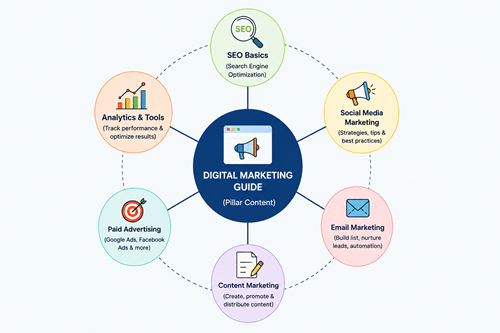
Publishing random articles can make your website feel unorganized.
Topic clusters group related articles around one main subject, making it easier for readers and search engines to explore your content. This structure helps visitors discover more pages, keeps them on your website longer, and shows that you cover a topic in depth rather than with just a single article.
Create a Cornerstone Article
A cornerstone article is your most detailed guide on an important topic.
It covers the subject from start to finish and links to related articles that explain each section in greater detail. This helps readers find more useful content while giving search engines a clear understanding of your website’s structure.
Example
How to make money from blogging: A full guide for beginners
Publish Supporting Articles
Once your cornerstone article is ready, create supporting articles that cover related topics in more detail.
Link these articles back to the main guide and connect them where relevant. This helps readers explore the topic more deeply and strengthens the overall structure of your website.
Examples
- How to start a blog in 2026
- Best affiliate programs for beginners
- Best web hosting affiliate programs
- 20 places to find sponsored post opportunities for your blog
Each supporting article should link back to the cornerstone guide.
Takeaway:
Topic clusters create a stronger website structure and help readers explore your content more easily.
9. Add an FAQ Section
An FAQ section helps you answer common questions that may not fit naturally into the main article.
It gives readers quick answers without making them search elsewhere. This will also improve your chances of appearing for question-based searches.
A well-written FAQ adds more value to your content and helps readers leave with fewer unanswered questions.
Answer Real Questions
Think about the questions your readers are likely to ask after reading your article.
Answer them in a clear and simple way using plain language. You can find ideas from Google search suggestions, online forums, social media discussions, or comments on your own blog.
Examples
- Which web hosting is best for beginners?
- How long does SEO take?
- Which social media platform suits small businesses?
- How much RAM does a gaming laptop need?
Takeaway:
A well-written FAQ helps readers find quick answers and improves the overall usefulness of your article.
10. Improve Website Speed
Nobody likes waiting for a slow website to load. If your pages take too long, visitors may leave before reading your content.
A faster website creates a better experience, encourages people to stay longer, and can improve your visibility in search results.
Simple improvements, such as optimizing images, using good hosting, and reducing unnecessary scripts, can make your blog feel much faster.
Compress Images
Large images can slow down your website and increase page loading time. Compress images before uploading to reduce file size while maintaining good quality. Faster-loading pages create a better experience for visitors and help your blog perform better in search results.
Examples
- Convert JPG images to WebP.
- Resize gadget photos before uploading.
- Compress featured images.
Choose Reliable Web Hosting
Your hosting provider plays a big role in your website’s speed and uptime.
A reliable host helps your pages load faster and keeps your blog available for visitors around the clock. As your traffic grows, good hosting also handles more visitors without slowing down your website.
Examples
- Kinsta- Read Kinsta Review
- WPX Hosting- Read WPX Hosting Review
- Rocket hosting- Read Rocket.net Review
Reduce Unnecessary Plugins
Too many plugins can slow down your website, especially if some are outdated or poorly coded.
Keep only the plugins you really need and remove the rest. Regularly review your installed plugins to make sure each one still serves a useful purpose and does not affect your website’s performance.
Examples
- Delete unused page builders.
- Replace multiple plugins with an allrounder plugin (Eg, Rank Math SEO)
- Replace heavy plugins with lightweight alternatives.
Takeaway:
A faster website keeps visitors happy and encourages them to explore more pages. Simple speed improvements can make a noticeable difference.
11. Make Your Website Mobile-Friendly
A large number of people read blogs on their phones and tablets. If your website is hard to use on a small screen, visitors may leave quickly.
A mobile-friendly website is easy to read, loads quickly, and works well on every device. Improving the mobile experience keeps readers engaged and can also help your pages perform better in search results.
Check Your Design
Test your website across several screen sizes to ensure everything looks clean and works properly.
Text should be easy to read, buttons should be simple to tap, and images should fit the screen without breaking the layout. A smooth mobile experience keeps visitors on your website longer.
Examples
- Responsive WordPress themes
- Mobile-friendly navigation
- Readable font sizes
Optimize Images for Mobile
Large images can slow down your website on mobile devices.
Resize and compress them so they load quickly without losing quality. Also, use responsive images that automatically adjust to fit smaller screens.
This helps your pages load faster and improves the reading experience for mobile users.
Takeaway:
A mobile-friendly website creates a better experience for smartphone users and helps you reach a larger audience.
12. Build High-Quality Backlinks
Backlinks are links from other websites pointing to your content. Search engines treat quality backlinks as a sign that your content is useful and trustworthy.
Focus on earning links naturally by publishing valuable content that people want to reference.
Publish Link-Worthy Content
Create articles that people naturally want to reference. Original research, detailed guides, free tools, and useful statistics attract more backlinks than short opinion posts.
Examples
- Web hosting comparison chart
- Social media image size guide
- Smartphone launch calendar
- WordPress security checklist
Write Guest Posts
Guest posting helps you reach a new audience while earning valuable backlinks to your website.
Write useful articles for trusted blogs in your niche and include a relevant link to your content when appropriate. Focus on sharing helpful information, not just getting a backlink.
Promote Your Best Content
People cannot link to your content if they never discover it. Share your best articles through social media, email newsletters, online communities, and industry forums.
The more visibility your content receives, the greater the chance that bloggers, website owners, and publishers will link to it naturally.
Takeaway:
Focus on earning backlinks through useful content and genuine relationships. A few high-quality backlinks are far more valuable than hundreds of low-quality ones.
13. Promote Every Blog Post
Writing a great blog post is only one part of growing your audience. You also need to put your content in front of the right people.
A well-planned promotion strategy helps your articles reach readers beyond search engines. By sharing your content across several channels, you can attract new visitors, encourage engagement, and keep your blog growing long after you publish it.
Share on Social Media
Share every new blog post on the social media platforms where your audience spends time. Go beyond your own profile by posting in relevant Facebook Groups, LinkedIn groups, Pinterest group boards, Reddit communities, and X.
Join conversations, answer questions, and share your article when it genuinely helps others. This approach can bring steady traffic and introduce your blog to new readers.
Go Beyond Regular Social Networks
Don’t limit your promotion to the biggest social platforms. Share your blog posts on Bluesky, Mastodon, YouTube, Threads, and other niche communities where your audience is active.
Each platform gives you another chance to reach new readers. Adjust your message to match the platform and encourage people to visit your website for the full article.
Collaborate With Other Creators
Connect with bloggers, YouTubers, newsletter writers, and creators.
You can mention each other’s content, work on a joint project, appear in interviews, or exchange expert insights. These collaborations help you reach new audiences and can bring steady traffic to your blog.
Takeaway:
Promotion should become part of your publishing process. The more people who discover your content, the greater your chances of attracting steady traffic.
14. Build an Email List

Search rankings and social media algorithms can change at any time, but your email list belongs to you. It gives you a direct way to reach people who already enjoy your content.
Every new subscriber is a potential returning visitor. As your list grows, you can bring readers back to your latest blog posts, share useful resources, and build stronger relationships with your audience.
Offer Something Valuable
Give people a good reason to join your email list. Offer a free checklist, ebook, template, toolkit, or exclusive guide that solves a real problem.
You can also invite your social media followers to download it by subscribing. A useful free resource encourages more sign-ups and helps turn casual visitors into loyal readers.
Examples
- Social media content calendar
- 100+ ChatGPT prompts for content creators
- 100+ AI prompts for image generation
- Website launch checklist
Send Useful Emails
Don’t email your subscribers only to promote new blog posts. Share useful tips, helpful resources, industry news, or exclusive content they won’t find elsewhere.
You can also highlight your latest YouTube video or popular Reddit discussions. When your emails provide real value, readers are more likely to open them and visit your website regularly.
Takeaway:
An email list helps bring visitors back to your website and builds stronger relationships with your audience.
15. Update Older Blog Posts
Your older blog posts can still bring valuable traffic if you keep them fresh. Search trends, tools, and information change over time, so articles written months or years ago may need improvements.
Review your existing content regularly, update outdated details, add new information, and improve the overall quality.
Refreshing older posts is usually faster than writing a new article and can help increase your blog traffic.
Refresh Outdated Information
Replace old facts, screenshots, broken links, and discontinued products. Add recent information so readers can trust your content.
Examples
- Update “Best Android Phones 2024” with current models.
- Replace old Facebook interface screenshots.
- Add new web hosting plans and pricing.
Add New Sections
Expand articles by answering new questions or covering recent developments. A more complete guide gives readers more value.
Examples
A guide about web hosting can include:
- AI website builders
- NVMe storage
- New hosting types
Improve Titles and Meta Descriptions
Your older titles and meta descriptions may no longer attract attention in search results. Rewrite them to make the benefit of your article clearer and more appealing.
A stronger title and a compelling meta description can encourage more people to click, even if your ranking stays the same.
Example
Old:
Best Smartphones of 2025
Improved:
10 Best Smartphones Under $500 in 2026
Fix Broken Links
Broken links can frustrate readers and reduce confidence in your website.
Check your older articles regularly for links that no longer work, then update or remove them. Keeping every link active creates a smoother reading experience and helps visitors continue exploring your content without running into error pages.
Takeaway:
Don’t ignore your older content. Updating valuable articles is one of the easiest ways to increase blog traffic without creating everything from scratch.
16. Repurpose Content
You don’t need to create brand-new content for every platform.
One blog post can be turned into several content formats and shared across multiple channels. This helps you reach more people without having to start from scratch each time.
Repurposing content also extends the life of your articles and gives readers more ways to discover your website.
Turn Blog Posts Into Social Content
A single blog post can become several social media updates.
Share useful tips, key takeaways, short videos, carousels, infographics, or polls based on your article. Link back to the full post for readers who want more details. This keeps your content active and helps attract new visitors over time.
Examples
- LinkedIn carousel
- Instagram infographic
- X thread
- Facebook post
Create Videos
Turn your blog posts into short or detailed videos for platforms like YouTube, TikTok, Instagram Reels, or Facebook.
Explain the main points, share practical tips, and invite viewers to read the full article for more information.
Videos can introduce your content to a wider audience and bring more visitors to your website.
Examples
- Web hosting setup guide
- Smartphone tips
- WordPress tutorial
- Canva design tutorial
Takeaway:
Repurposing helps you reach new audiences without creating fresh content every time.
17. Track Performance With Google Analytics and Google Search Console
Google Analytics and Google Search Console help you understand how people find and use your website.
They show which blog posts attract visitors, what keywords bring traffic, and where readers leave your site. Reviewing this data regularly helps you make smarter decisions and improve your content based on real results.
Google Analytics
Google Analytics shows how visitors interact with your website.
You can see which blog posts receive the most traffic, how long readers stay, which pages they visit next, and where they leave. These insights help you understand what your audience enjoys so you can create more content that performs well.
Track metrics like:
- Page views
- Session duration
- Traffic sources
- Popular pages
Google Search Console
Google Search Console helps you understand how your website performs in Google Search.
It shows which keywords bring visitors, how frequently your pages appear in search results, and which articles receive the most clicks. You can also identify indexing issues and discover opportunities to improve your existing content.
Track information like:
- Search queries
- Clicks
- Impressions
- Average position
Takeaway:
Review your analytics regularly. Small improvements based on real data produce better results than guessing.
18. Publish Consistently
Growing a successful blog takes time and regular effort. Publishing new content consistently gives readers a reason to return and helps search engines discover fresh pages on your website.
You don’t need to publish every day. A realistic schedule that you can maintain for months is far more effective than posting frequently for a short time and then stopping.
Examples
- One article every week
- Two articles each month
- One product review every Friday
Takeaway:
Consistency builds trust with readers and steadily expands your content library.
19. Optimize for AI Search

More people now use AI-powered search tools to find answers, compare products, and learn new topics.
Creating content that is clear, accurate, and well-organized helps these systems understand your pages more easily. Use descriptive headings, answer questions directly, and support your points with practical examples.
When your content is easy to follow, it has a better chance of reaching readers through both search engines and AI search.
Write Clear Answers
Answer your readers’ questions clearly and get to the point without unnecessary explanations.
Use simple language, short paragraphs, and descriptive headings to make your content easy to understand.
Clear answers help readers find what they need quickly and make it easier for AI search tools to understand your content.
Build Trust
Share accurate information that readers can rely on. Support your advice with practical examples, real experience, or trusted sources whenever needed.
Keep your content up to date and correct outdated information. When people trust your website, they are more likely to return, share your articles, and recommend your content to others.
Improve Readability
Make your content easy to read from start to finish. Use short paragraphs, clear headings, simple words, and enough spacing between sections.
Break complex topics into smaller parts so readers can follow them without feeling overwhelmed. Easy-to-read content also helps search engines and AI systems understand your pages more clearly.
Takeaway:
Create content for people first. Clear, trustworthy, and well-structured articles are more likely to perform well in both traditional search results and AI-powered search experiences.
Quick Wins You Can Try This Month
If you want faster progress, start with a few simple improvements.
- Update five older blog posts.
- Improve titles on your top-performing pages.
- Add internal links to recent articles.
- Compress large images.
- Publish one in-depth guide.
- Share every new article on social media.
- Review Google Search Console for low-click pages.
- Fix broken links.
- Improve page loading speed.
- Add an FAQ section to your most popular articles.
These tasks require little time but can produce noticeable improvements over the next few months.
Final thoughts
Learning how to increase blog traffic takes time, but every improvement moves your website in the right direction.
Start by creating content people genuinely want to read. Optimize every article, improve your website experience, and promote your content consistently. Small changes made every week can produce impressive results over time.
You do not need to apply every strategy at once. Pick two or three areas that need the most attention, make steady improvements, and measure your progress. As your content library grows, your website will have more opportunities to attract readers from search engines, social media, newsletters, and AI-powered search platforms.
The key is to stay consistent. Helpful content, regular updates, and a better user experience will continue to bring visitors long after you publish each article.