
Direct Answer
To start a profitable blog, first select a niche and register a unique domain name. Choose reliable hosting (like WPX), install WordPress, and customize your site with a fast theme. Focus on publishing high-quality, SEO-optimized content to drive traffic. Finally, monetize your readership through Google AdSense, affiliate marketing, and sponsored posts to generate consistent income.
Let’s get one thing straight. You’ve seen a dozen articles with titles like this one.
You might have even heard someone at a family dinner confidently declare, “Is blogging still a thing?
Isn’t that dead?”
Let me answer that for you: No, blogging is not dead. Not even close.
But it has changed. The old way of doing things—writing a quick diary entry, stuffing it with keywords, and hoping for the best—is long gone. Today, in 2026, starting a blog is less about being a “blogger” and more about becoming a small, focused media company.
And the best part? It’s more possible than ever for a complete beginner to build a profitable blog from scratch.
Why? Because the playing field has been levelled. New tools, especially AI, have made the technical side of blogging easier than ever. Search engines like Google have gotten so smart that they are better than ever at rewarding what truly matters: authentic, helpful, and expert content.
So, if you’re tired of just thinking about it and ready to take action, you’ve come to the right place. This isn’t a get-rich-quick scheme. This is a step-by-step roadmap that will take you from a simple idea to a real, money-making blog.
We’re going to cover everything you need to know, from building your foundation in the first 30 days to creating a content engine that attracts visitors and, finally, to the realistic ways you can monetize your new blog.
Ready? Let’s build your future.
Launch a Profitable Blog in 2026: Step-by-Step for Beginners
Let us explain this topic in three parts.
Part 1: Building Your Foundation (The First 10 Days)
The first days are all about making the right decisions. The choices you make now will set the stage for everything that follows.
Don’t rush this part. Get this right, and you’ll be building your blog on solid rock, not shifting sand.
Chapter 1: How to Choose a Profitable Niche You Won’t Get Bored With
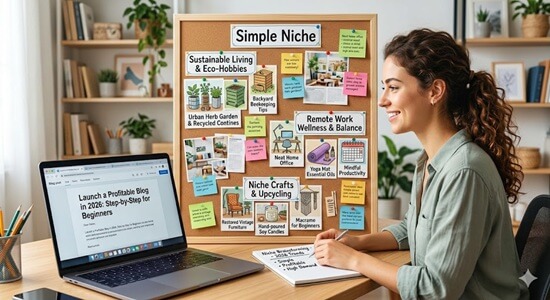
This is the most important decision you will make. Your niche is the specific topic you will be writing about.
Choose the wrong one, and you’ll either run out of things to say or discover that no one is willing to pay for information on that topic.
The secret to a great niche is the Passion + Profit Formula.
Your ideal niche sits at the sweet spot where these three circles overlap:
- What you enjoy: You will be spending hundreds of hours on this topic. If you don’t have a genuine interest in it, you will burn out. What do you find yourself reading about on a lazy Sunday? What do your friends ask you for advice on?
- What you know (or are willing to learn): You don’t have to be the world’s leading expert, but you need to know more than the average person. More importantly, you must have a burning curiosity to learn more and share that journey with your audience.
- What people will pay for: Passion is great, but profit is the goal. Is there money in this niche? Are people already spending money to solve problems or achieve goals related to this topic?
Simple Niches That Actually Win in 2026
Forget trying to compete in hyper-competitive niches like “weight loss” or “making money online.” The real opportunity is in going small and specific.
Here are some examples of overlooked niches that have huge potential:
- Specific Hobbies: Instead of “gardening,” think “container gardening for apartment dwellers.” Instead of “pets,” think “training rescue dogs with anxiety.”
- Specific Diets: Instead of “healthy eating,” think “gluten-free baking for families” or “meal prep for the keto diet.”
- Local Focus: Instead of “travel,” think “weekend road trips from [Your City].”
- Boring Industries: Topics like “learning Microsoft Excel,” “home organization,” or even “welding for beginners” can be incredibly profitable because they are practical and underserved.
Quick-Fire Niche Validation Checklist:
Before you commit, run your idea through this quick test:
- Search Volume: Use a free tool like Google Keyword Planner to see if people are actually searching for terms related to your niche.
- Affiliate Products: Go to Amazon and see if there are products related to your niche. Are there books, tools, or equipment people are buying?
- Community Interest: Are there active Facebook groups, Reddit communities (subreddits), or online forums dedicated to this topic? An active community is a sign of a passionate audience.
- Competition: A little competition is a good thing; it proves the market exists. But if the first page of Google is dominated by huge, established brands, it might be too tough for a beginner. Look for search results where smaller blogs or forums are ranking.
Chapter 2: How to Choose a Domain Name and Hosting That Sets You Up for Success
Your domain name is your blog’s address on the internet (e.g., myawesomeblog.com), and hosting is the plot of land where your blog lives.
First, let’s get one crucial thing out of the way: You MUST use self-hosted WordPress.
It’s tempting to use free platforms like Blogger, Tumblr, or Substack. But it’s a trap.
Free platforms have major limitations:
- You don’t own it: They can shut your site down for any reason.
- Limited Monetization: Most free platforms have strict rules about how you can make money, especially with ads and affiliate links.
- Unprofessional Look: A domain like myblog.wordpress.com immediately signals that you are an amateur.
- Poor SEO: It’s much harder to rank a site on a free platform.
Think of it like this: A free platform is like renting an apartment with a strict landlord. A self-hosted WordPress site is like owning your own house. You have complete freedom and control.
Choosing a Brandable Domain:
Your domain name should be memorable and easy to type. Here are some tips:
- Keep it short and simple.
- Try to get a .com extension. It’s the most recognized and trusted.
- Make it brandable: Instead of a keyword-stuffed name like bestgardeningtips.com, try something more creative like thehappygardener.com.
- Avoid hyphens and numbers.
If you are struggling to craft a perfect domain name for your blog, use a domain name suggestion tool. This will help you find a memorable, keyword-specific name in a few moments.
Register your domain:
Now that you have brainstormed the perfect name, it is time to officially claim it! Registering your domain name is like buying the digital deed to your website. It makes your brand look professional and gives your readers an easy, memorable way to find you online.
While .com is still the gold standard for global credibility and trust, don’t panic if your first choice is already taken. You can absolutely explore industry-specific extensions like .blog, .tech, or .store to stand out. If you are specifically targeting a local audience, country-specific tags like .in (for India), .uk, or .au work wonders for local SEO.
How to register: You can buy a domain through dedicated domain registrars like Namecheap or GoDaddy, which typically costs around $10 to $15 per year.
Pro Tip for Beginners: If you want to save money, hold off on buying the domain just yet! Many top-tier web hosting providers (like GreenGeeks, Hostinger, or Bluehost) will actually give you a custom domain name completely free for your first year when you sign up for their hosting plans.
(Important: When you do register, always make sure to enable “Domain Privacy Protection.” This hides your personal email and phone number from public databases, keeping your inbox safe from spammers.)
Web Hosting Explained for Beginners:
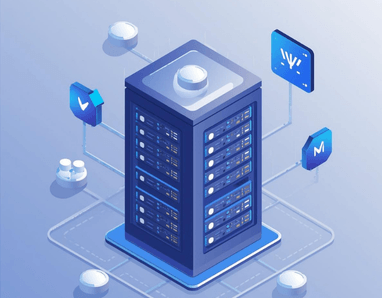
Web hosting sounds technical, but it’s a service that stores your website’s files and makes them available on the internet. For beginners, I recommend using a shared hosting service like Bluehost, DreamHost, or HostArmada. They are affordable, reliable, and offer excellent customer support.
Most importantly, they offer a one-click WordPress installation, which makes the setup process incredibly simple. Signing up is easy: you’ll pick a plan, register your domain name (most hosts offer a free one for the first year), and follow the on-screen instructions.
Chapter 3: Your Blog Setup: A 15-Minute, No-Tech-Skills-Required Guide

Once you have your hosting, setting up your blog is surprisingly fast.
One-Click WordPress Installation: Log in to your hosting account, find the WordPress icon, and click it. The installer will do all the heavy lifting for you. It’s really that easy.
Choosing a Fast, SEO-Friendly Theme: Your theme is the design of your blog. While it’s tempting to pick a theme with all the bells and whistles, this is a mistake. Fancy themes are often slow, which hurts your Google rankings. Start with a free, lightweight theme like Astra, GeneratePress, or Kadence. They are fast, simple, and look great. You can always upgrade later.
Essential Plugins Every New Blog Needs: Plugins are like apps for your website. They add new features. Don’t go crazy installing dozens of them, as this can slow down your site. Here are the must-haves for any new blog:
- SEO: Yoast SEO or Rank Math (Paid). These will guide you through optimizing your posts for search engines.
- Caching: W3 Total Cache or WP Rocket (Paid). This makes your site load faster.
- Security: Wordfence Security. This protects your site from hackers.
- Analytics: MonsterInsights (Paid). This connects your blog to Google Analytics, allowing you to see exactly how people find and use your site.
SEO-Friendly URL Structure: Before you publish your first post, it is crucial to set up your website’s permalink structure. Permalinks are the permanent URLs to your individual pages and blog posts. By default, WordPress might use a messy structure with numbers (like yourblog.com/?p=123), which is bad for both users and search engines.
To fix this, log into your WordPress dashboard and navigate to Settings > Permalinks. Select the “Post name” option and save your changes. This ensures your URLs are clean, easy to read, and contain your target keywords (e.g., yourblog.com/make-money-blogging), giving you an immediate SEO boost.
Creating Categories and Tags: Organizing your content makes it easier for readers to find what they are looking for and helps search engines understand your site’s structure. In WordPress, you do this using Categories and Tags.
Think of Categories as the “Table of Contents” for your blog. They represent broad topics (e.g., “Finance,” “Travel,” “Tech”). Ideally, you should have 5 to 10 main categories.
Tags, on the other hand, are like the “Index” at the back of a book. They describe specific details covered in a post (e.g., “saving tips,” “budgeting app”). To set them up, simply go to Posts > Categories or Posts > Tags in your WordPress dashboard and start adding your core topics.
Create Essential Pages (About Us & Contact Us): Every professional blog needs standard pages to build trust with readers and search engines. Unlike blog posts, pages contain static content that doesn’t change frequently. Go to Pages > Add New to create these two mandatory pages:
- Contact Us: Give your visitors, fellow bloggers, and potential sponsors a way to reach you. You can use a free form plugin like WPForms or Contact Form 7 to easily embed a contact form on this page without exposing your personal email address to spammers.
- About Us: This is often the most visited page on a new blog. Share your story, explain why you started the blog, and tell readers how your content will help them.
Part 2: Your Content and Traffic Engine (Day 11- Day 40)
With your blog set up, the real work begins. The next few days are all about creating content and getting your first visitors. This is the grind, but it’s also where you build the momentum that will lead to success.
Chapter 4: How to Create Content That Google and Humans Will Love
Content is the heart of your blog. Without great content, nothing else matters. Your goal is to create the single best resource on the internet for any given topic you cover.
Keyword Research for Beginners:
Before you write a single word, you need to know what people are searching for. This is called keyword research.
Forget complicated tools for now. Your goal is to find long-tail keywords—longer, more specific phrases that are less competitive.
Think like a beginner. What questions did you have when you first started in your niche?
- Instead of “keto diet,” you target “how to start the keto diet without getting the flu.”
- Instead of “grow tomatoes,” you target “what is the best fertilizer for tomatoes in a pot.”
Use Google’s autosuggest feature. Type in a broad topic and see what Google suggests. These are things people are actually searching for! Also, look at the “People Also Ask” and “Related Searches” sections on the Google search results page. This is a goldmine of content ideas.
Your First 10 Blog Posts:
Don’t just write randomly. Your first 10 posts should cover the foundational topics in your niche. A good mix includes:
- Informational Posts (“What is…” ): These posts answer specific questions and build your authority. (e.g., “What is a 401(k) and How Does It Work?”)
- Transactional Posts (“Best of…” ): These are review-style posts that are great for affiliate marketing. (e.g., “The 5 Best Running Shoes for Beginners in 2026”)
- How-To Guides: These are step-by-step tutorials that solve a specific problem. (e.g., “How to Repot an Orchid Without Killing It”)
Writing with AI (The Smart Way):
In 2026, AI is an indispensable tool for bloggers. But it’s just that—a tool. It’s not a replacement for your brain.
Use AI tools like ChatGPT to:
- Brainstorm blog post ideas.
- Create detailed outlines.
- Do research and summarize complex topics.
- Help you get past writer’s block.
DO NOT just copy and paste what an AI writes. Google is smart and can detect purely AI-generated content. More importantly, your readers can understand it easily. AI can’t replicate your personal stories, your unique voice, or your genuine experience. Use AI as your assistant, not your author.
Simple On-Page SEO:
On-page SEO is just the practice of optimizing your individual posts so Google understands what they are about.
With a plugin like Rank Math or Yoast, this is easy. Just follow their checklist:
- Use your main keyword in your post title.
- Use it in your headings (H2s and H3s).
- Include it naturally in the first paragraph.
- Sprinkle it and related keywords throughout the article. Don’t force it! Write for humans first.
- Use descriptive names for your images (e.g., red-running-shoes.jpg).
Chapter 5: Create Google & Bing Webmaster Accounts
To get traffic from search engines, you need to let them know your website exists. Google Search Console (formerly Webmaster Tools) is a free tool that helps you monitor your search rankings, submit XML sitemaps, and fix website errors. Sign up with your Google account and verify your domain ownership.
Don’t stop at Google. Microsoft’s Bing search engine also drives high-quality traffic.
Go to Bing Webmaster Tools and create an account. The best part? Bing allows you to import your site data directly from your Google Search Console account with just one click, saving you time and instantly expanding your search reach.
Chapter 6: Create a Google Analytics Account

Once your blog is live, you need to track how many people are visiting and what they are reading. Google Analytics 4 (GA4) is the industry standard for monitoring website traffic, user behavior, and audience demographics—and it is completely free.
Go to the Google Analytics website, sign up, and create a property for your blog. You will be given a “Measurement ID.” To easily connect it to your blog without touching any code, use a WordPress plugin like MonsterInsights or Google Site Kit.
Reviewing this data regularly will help you understand which blog posts are the most popular so you can double down on what works and increase your revenue.
Chapter 7: How to Promote Your Blog and Get Your First 1,000 Visitors

Hitting “publish” is not the last step. At first, you need to actively promote your content.
Beyond Google: Your Second Traffic Source:
For the first few months, Google will likely ignore you. This is normal. That’s why you need to pick one other platform to focus on.
Don’t try to be everywhere. If your niche is very visual (like cooking or crafts), Pinterest can be a massive traffic driver. If you’re good on camera, creating short videos for YouTube or TikTok that link back to your blog can be incredibly effective. If you’re in a professional niche, engaging on LinkedIn can work wonders.
Build an Email List from Day One:
I cannot stress this enough. Your email list is the single most valuable asset you will build. It’s a direct line of communication with your most loyal fans. You own it, and no algorithm change can take it away from you.
Start simple. Use a service like Mailchimp or EmailOctopus (they offer free plans). Create a simple form that offers a small incentive (a checklist, a short guide) in exchange for an email address. Put this form in your blog posts and on your homepage.
Engage with Your Community:
Find where your target audience hangs out online. Is it a specific Facebook group? A subreddit? A niche forum? Become an active, helpful member of that community.
Answer questions. Share your expertise. When it’s relevant and not spammy, you can share a link to a helpful article on your blog.
Part 3: Monetizing Your Blog (Months 6-12 and Beyond)
Now for the part you’ve been waiting for. After months of hard work building your content foundation and attracting an audience, it’s time to start making money.
Chapter 8: The 4 Most Realistic Ways to Make Money Blogging in 2026
There are many ways to monetize a blog, but these four are the most practical and proven for beginners.
Monetization Method #1: Affiliate Marketing (Your First Dollar)
This is the perfect starting point. Affiliate marketing is simply recommending products or services you love and earning a commission when someone purchases through your unique link.
- How it Works: You sign up for an affiliate program (like Amazon Associates or a specific company’s program). You place your affiliate link in your content. When a reader clicks that link and buys something, you get a small cut. It doesn’t cost the reader anything extra.
- Your Strategy: Don’t just plaster links everywhere. Focus on 3-5 core products or services that you genuinely use and believe in. Write in-depth reviews, “best of” lists, and tutorials that show people how to get the most out of these products. This is where those transactional posts you wrote earlier come in handy.
Monetization Method #2: Display Advertising (Semi-Passive Income)

These are the ads you see in the sidebar and content of many blogs. They are a great way to earn semi-passive income.
- How it Works: You join an ad network. They place code on your site that automatically displays ads. You get paid based on how many people see or click on these ads.
- Your Strategy: When you’re just starting, you can use Google AdSense. The payout isn’t great, but the traffic requirements are low. Your real goal should be to qualify for premium ad networks like Mediavine or Raptive (formerly AdThrive). These networks pay much, much more, but they have traffic requirements (currently around 50,000 and 100,000 monthly sessions, respectively). Hitting this traffic level should be a major goal for your new blog.
Monetization Method #3: Selling Your Own Digital Products
This is where you can start earning a significant income. Once you have an audience that trusts you, you can create and sell your own simple digital products.
- How it Works: You create a product once, and you can sell it over and over again. The profit margins are incredibly high.
- Your Strategy: Start small. Don’t try to create a massive course. Your first product could be a simple ebook, a pack of printable checklists, a set of templates, or a paid workshop. Look at what your most popular blog posts are. What problems are your readers trying to solve? Create a product that offers a premium, all-in-one solution.
Monetization Method #4: Offering Services or Coaching
If you have a professional skill, your blog can be the ultimate lead-generation tool.
- How it Works: Your blog posts demonstrate your expertise. Readers who need more hands-on help can then hire you.
- Your Strategy: Create a “Work With Me” page on your blog. This could be for freelance writing, consulting, web design, or one-on-one coaching related to your niche. It’s the fastest way to make significant money, but it’s also the most time-intensive, as you are trading time for dollars.
Chapter 9: Your 12-Month Blogging Roadmap: From Zero to Profitable
- Months 1-3: Head Down, Content Mode. Your only job is to publish high-quality, helpful content. Aim for at least 10-15 solid posts. Don’t even think about making money yet.
- Months 4-6: Promotion and List Building. Continue publishing content, but shift some of your focus to promoting your posts on your chosen social media platform and getting your first email subscribers.
- Months 6-9: Initial Monetization. Your traffic should be starting to pick up. Apply for Google AdSense. Start incorporating affiliate links into your new and existing content.
- Months 9-12: Analyze and Optimize. Look at your analytics. What posts are bringing in the most traffic? Double down on those topics. If your traffic is growing, apply to a premium ad network. Start brainstorming your first simple digital product.
Final thoughts
We’ve covered a lot. It might seem overwhelming, but every successful blogger you admire started exactly where you are now: with an idea and a blank screen.
The secret to success in blogging is painfully simple: consistency. The only difference between a failed blog and a successful one is that the successful blogger didn’t quit. They kept publishing, they kept learning, and they kept showing up.
Don’t get stuck in “analysis paralysis,” endlessly researching the perfect niche or the perfect theme. The truth is, you can’t steer a parked car. You need to get moving, even if you’re not entirely sure of the direction. Your first posts won’t be great. Your first attempts at promotion might fall flat. That’s okay. It’s part of the process.
You have the roadmap. You have the tools. You have the knowledge. The only thing missing is action.
So, what are you waiting for?
If you have any questions, let us know through the comment form below.