
Direct Answer
SocialBee is a social media management tool for scheduling posts, recycling evergreen content, and tracking performance across social networks. It includes AI-powered Social Media Copilot, a unified social inbox, hashtag collections, RSS feed automation, and team collaboration tools. Universal Posting also lets users plan content for platforms that do not support direct publishing. Plans start at $24 per month.
Struggling to keep up with your social media posts? Between writing captions, scheduling content, replying to comments, and checking analytics, managing multiple accounts can eat up hours of your day. SocialBee promises to make this work easier by bringing your social media tasks under one roof.
You can use it to schedule posts, recycle evergreen content, generate captions with AI, monitor performance, and manage conversations through a unified social inbox. It also offers workspaces, content categories, RSS feed automation, and tools for team collaboration.
But does SocialBee deliver enough value for its price? In this SocialBee review, we’ll explore its key features, pricing plans, pros and cons, and publishing options. We’ll also look at its AI Social Media Copilot and other tools to help you decide whether it’s the right choice for your business.
| Disclosure: Your support helps keep the site running! We earn a referral fee for some of the services we recommend on this page. |
- What is SocialBee?
- SocialBee Review 2026
- 1. Workspaces
- 2. Content Categories
- 3. Social media scheduling
- 4. Content Recycling
- 5. Social media copilot
- 6. Social media analytics
- 7. Social inbox
- 8. Team management
- 9. Calendar
- 10. Bulk post editor
- 11. Media library
- 12. Integrations
- 13. Best time to post
- 14. Hashtag collections
- 15. Auto post from RSS feeds
- 16. Hire experts
- 17. Affordable pricing
- 18. All leading social networks
- Final thoughts
- SocialBee pricing
- FAQ
What is SocialBee?
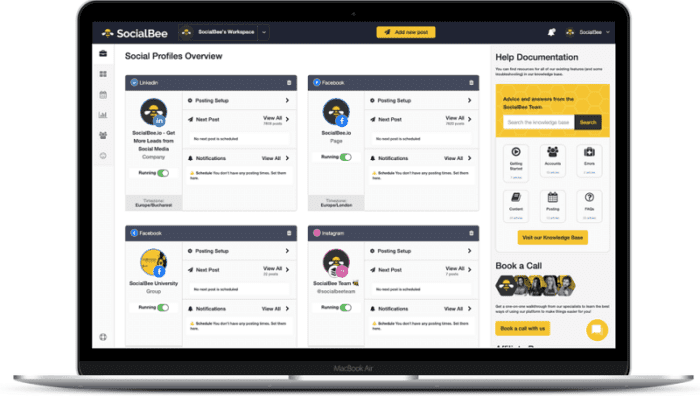
SocialBee is a great all-in-one social media management tool for businesses. It allows you to create, schedule, post, and monitor your content performance from one place.
You can promote content across leading social networks, including Facebook pages, Instagram (personal & business), X, LinkedIn (profile & company), Pinterest, TikTok, YouTube, Threads, Bluesky, and Google Business. It also allows you to post content on any platform with a universal profile.
They have premium customer support and a 14-day free trial on all subscription plans.
Key Features
Rating
Pricing
$24/mo
Create and Share Social Media Content with SocialBee
It is easy to schedule and share your social media posts with SocialBee. Sign in to your SocialBee dashboard and connect all required social accounts.

SocialBee organizes your social media posts in different categories. So you should create a category first before scheduling content. Click on the Category icon from the left pane and tap the ‘Create Category’ button.

Assign a category name and choose its type as ‘Evergreen’ to automatically recycle content in it. Tap the Create button to save. Now, you can add new posts to the category.
Click ‘Add new post’ at the top. Then, you will get a screen like this.
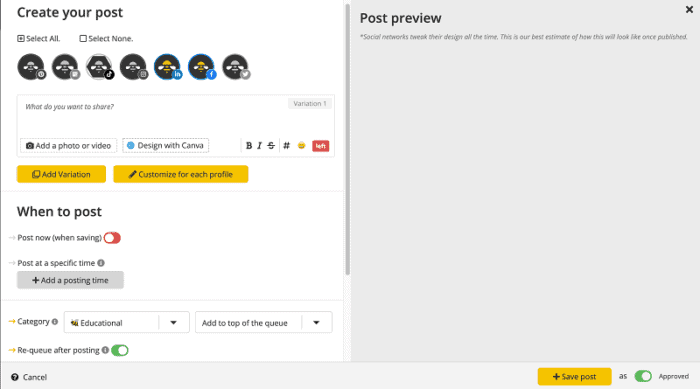
Select social media accounts where you want to share the content.
In the content area, enter your text along with the post URL. SocialBee will automatically shorten your URL as per the workspace settings. It is integrated with popular link shortener services like Bitly, Rebrandly, JotURL, Replug, etc.. You can also use SocialBee’s built-in link shortener to add a professional touch to your social media posts.
You will see a post preview for all profiles on the right side of the screen. Tap the ‘Customize for each profile’ button to adjust your post for each social media platform (change word count, image size, add hashtags, etc.) and boost your content performance.
You also have an “Add Variation” button that lets you create variations of your evergreen posts, keeping your content fresh with each repost.
Scroll down to the bottom to set a schedule.
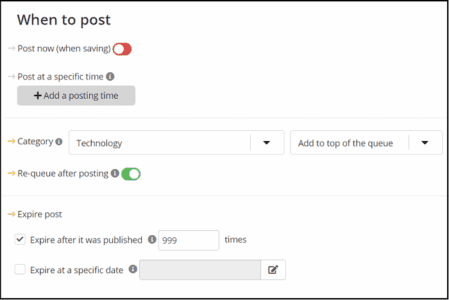
Pick a content category from the drop-down list first. SocialBee will automatically recycle your content at frequent intervals. The post can be shared in four ways—share instantly, post at a specified time, or add to the top/bottom of the queue.
Pro Tips
How do you set up specific queue schedules for your social media profiles and pages? Open Schedule Setup in the left pane of your SocialBee dashboard, then choose a profile to create a schedule.

Select a day and time, and pick a category from the list to set up a new schedule. Socialbee will share content in order of precedence on selected profiles at the scheduled time. However, you can always shuffle the queue or share posts instantly from category pages.
Next, configure how long you want to share this content. You can set either an expiry date or a number of times, after which the item will move to the archives.
Finally, click on the ‘Add post’ button to save.
That’s it.
Open the respective category (Content > Categories) to edit and manage your posts anytime.

Start your 14-day free trial to test how SocialBee helps you automate social media promotions and increase traffic
SocialBee Review 2026
In this SocialBee review, we’ll take a closer look at its dashboard, key features, and publishing tools. We’ll explore how it handles daily social media tasks, what works well, and where it falls short. This will help you decide if SocialBee is worth your money.
1. Workspaces
SocialBee workspaces help you manage multiple brands or businesses without mixing their content.
You can keep each client’s social profiles, posts, and publishing schedules in a separate workspace. This makes it easier for agencies to manage multiple clients and for small businesses to manage multiple brands from a single account.
Each workspace can also have its own team members and access permissions, so you can assign tasks to the right people.
SocialBee’s Pro plan includes five workspaces and three users per workspace. Larger agency plans support more workspaces and team members. If you need extra space, you can purchase additional workspaces without upgrading to a higher plan.
2. Content Categories

SocialBee’s content categories help you organize social media posts by topic or purpose. You can create categories for blog posts, promotions, industry news, educational content, and customer questions. This makes it easier to maintain a balanced posting schedule without sharing the same type of content every day.
You can assign categories to specific time slots in your posting schedule. SocialBee then selects approved posts from those categories when a slot becomes available.
For content writers, this keeps articles and social updates organized, while small businesses can plan promotions alongside helpful posts.
3. Social media scheduling

SocialBee makes it easier to plan posts across multiple social media accounts from one dashboard. You can schedule text updates, images, carousels, videos, Instagram Reels, TikTok videos, Facebook Reels, YouTube Shorts, and other supported formats. You can set a specific date and time or add posts to content categories for automatic publishing.
SocialBee supports direct publishing on Instagram and TikTok, but some posts still require mobile reminders. Instagram Business accounts support automatic Reel publishing, while Creator and Personal accounts require reminders for Reels. On TikTok, eligible videos and image posts publish directly, but posts containing multiple videos may require manual publishing. Facebook Reels publish automatically to Pages, while Personal Profiles require reminders.
These options help small businesses, content writers, teams, and agencies plan content in advance and spend less time manually publishing posts.
4. Content Recycling
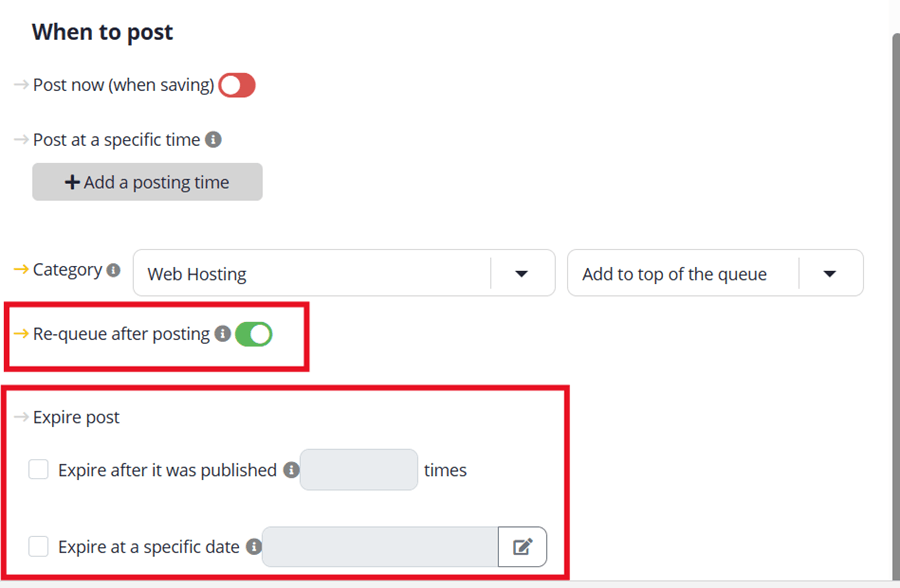
SocialBee’s content recycling feature helps you keep your social media accounts active without having to create new posts every day. You can set evergreen posts to re-queue after publishing, so SocialBee shares them again when they reach the front of your content queue. This works well for blog posts, tutorials, tips, and product guides that stay relevant over time.
You also get content expiry settings. You can stop a post from being shared after a set number of publications or on a specific date. This is useful for time-based promotions, such as Black Friday deals, holiday offers, and product launches. You don’t want an old discount showing up in your social media feed after the offer ends.
If you want to share a post only once, disable Re-queue after posting for that individual post. You can also turn off re-queuing for an entire content category.
5. Social media copilot
SocialBee’s Social Media Copilot helps you plan your social media strategy without having to start from scratch.
Enter your website URL, and it gathers details about your business, audience, services, and brand voice. If you don’t have a website, you can answer a few questions instead.
Copilot then suggests suitable social networks, content categories, posting schedules, and ready-to-edit posts with captions and images.
You can review the suggestions, edit the content, and approve posts before scheduling them. It also helps you find content ideas and keep your publishing calendar organized.
This feature is handy for small businesses, freelance content writers, and agencies managing multiple brands. It gives you a starting plan and saves time on content planning, while leaving you in control of what gets published.
Start your 14-day free trial
A 14-day free trial is available in all SocialBee plans. Connect your social accounts, schedule posts, and see how SocialBee works for you. Totally free! No credit card is required to activate your free trial.
6. Social media analytics
SocialBee helps you monitor your account growth, discover insights about your audience, and track your post reach and engagement.
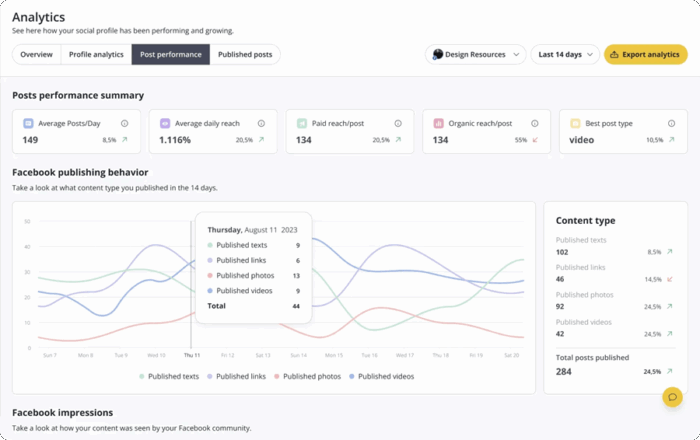
You can review key metrics such as reach, impressions, engagement, clicks, and follower growth, depending on the platform and available data. These reports help you spot popular posts and understand what your audience likes.
You can filter reports by social profile and date range, compare content categories and post formats, and find the best times to post. SocialBee also supports custom UTM parameters for tracking shared links and PDF reports for client updates.
These insights help small businesses improve their content plans, and help agencies show clients what their social media work achieves. Note that available metrics and data history vary by platform and subscription plan.
7. Social inbox
Social Inbox is another part of SocialBee that lets you manage comments, mentions, and direct messages from one dashboard.
You don’t have to switch between social media apps to keep up with customer questions or replies. You can organize conversations into custom boards and streams based on social profiles, clients, or campaigns. Email notifications also help you stay aware of new activity.
The inbox supports Facebook Pages, Instagram professional accounts, Threads, LinkedIn Company Pages, X, and YouTube. However, available interactions vary by platform. For example, YouTube supports comments, while Facebook and Instagram support comments, mentions, and direct messages.
This feature is handy for small businesses that handle customer queries and agencies managing several client accounts.
8. Team management

Add multiple users to each workspace to create content with the help of your team.
Send them an email invitation from SocialBee and control their user permissions by assigning them a specific role on the platform.
With your team in place, now you can oversee their workflow, tag users, provide feedback, edit their work, and approve or dismiss content before posting.
9. Calendar
SocialBee’s content calendar gives you a clear view of your scheduled social media posts.
You can monitor upcoming content, check when a post is due to go live, and edit content before publishing. If a post needs another round of sharing, you can re-queue it. You can also publish content instantly when you don’t want to wait for its scheduled time.
SocialBee lets you assign queue times to each social profile and content category. For example, you can schedule promotional posts for one time slot and educational content for another. This helps small businesses, content writers, and agencies maintain a steady posting schedule across multiple accounts without managing every post manually.
10. Bulk post editor
Bulk Editor is useful to manage several social media posts at once. You can select multiple posts within a content category and add or remove social profiles, approve posts, move them to another category, switch them to drafts, or delete them in one go. This saves time when you manage content for several brands or clients.
You can also import posts in bulk using a CSV file. Add captions, links, media URLs, and scheduled dates to the file, then upload it to SocialBee. This is handy for content writers and social media teams planning weeks of posts in advance.
11. Media library
SocialBee’s Media Library lets you upload images and videos in bulk and prepare them for social media posts. You can select the social profiles where you want to share the media, assign a content category, and add extra text to your posts. The preview panel helps you check the selected media before importing it.
You can import up to 100 media files in one batch, including images, videos, and GIFs. You can also choose to add imported posts as drafts or approved content. Advanced settings let you set expiry rules based on publishing count or time, which helps when importing a large content library.
This feature is handy for agencies managing several clients, small businesses planning campaigns, and content writers who want to prepare posts in bulk rather than upload each file separately.
12. Integrations
SocialBee connects with several tools that help you create content, automate tasks, and manage social media campaigns. Its integrations include Canva for designing posts, Unsplash and GIPHY for finding images and GIFs, and Zapier and Make for connecting SocialBee with other apps. You can also use URL shorteners to manage links in your posts.
For link tracking, SocialBee works with services such as Bitly, Rebrandly, Replug, and JotURL.
You can also connect Zapier, Pabbly, or Make to automate tasks and move content between apps. These integrations help you manage your social media workflow with fewer manual steps.
13. Best time to post
SocialBee suggests suitable times for sharing content on social media. You can use its recommended posting times to plan your schedule and reach your audience when they are more likely to be active. This saves you from guessing when to publish each post.
The recommendations are based on your past post performance, so they can be more relevant to your audience than general posting-time charts. You can use these suggestions when scheduling content, then review your analytics to see whether the timing improves engagement.
14. Hashtag collections
Hashtag Collections is another part that lets you save and organize hashtags for future posts. You can create separate groups for topics, campaigns, products, or social media accounts, then add a relevant collection when preparing a post. This saves time and keeps you from searching for the same hashtags every time you publish.
SocialBee also offers an AI hashtag generator to suggest hashtags based on your post content. You can review the suggestions and save suitable ones for later use.
This feature is handy for content writers, small businesses, and agencies that publish posts across several social profiles.
15. Auto post from RSS feeds
SocialBee’s RSS feed integration lets you share new blog posts on your social media accounts automatically.
Add your website’s RSS feed, choose the social profiles and content category, and set how you want new articles to be published. SocialBee checks connected feeds hourly and adds new content to your queue.
You can also import posts as drafts for review before publishing. This feature helps bloggers, publishers, and businesses promote fresh articles without sharing every link manually.
16. Hire experts
SocialBee’s ConciergeBee Store feature helps businesses find professional support for their social media work.
If you don’t have time to manage your accounts or need help with content creation, strategy, or account management, you can explore experts through its partner network. This option suits small businesses that lack an in-house marketing team and agencies that need extra help with client projects.
Check the available services, pricing, and expert profiles before choosing a provider, as these may vary.
17. Affordable pricing
SocialBee is a reliable and budget-friendly marketing tool for all business types. It starts at just $24/mo, allowing you to manage 5 social media accounts.
For a better perspective, let’s compare SocialBee with Agorapulse, a leading social media management tool for small to large-sized businesses.
| SocialBee | Agorapulse | |
|---|---|---|
| Supported Networks | Facebook, Twitter, LinkedIn, Pinterest, Instagram, TikTok, YouTube, Threads, Bluesky, and Google Business | Facebook, Twitter, Pinterest, LinkedIn, Instagram, and YouTube |
| Pinterest Support | Yes | Yes |
| Starting Price | $24/mo | $79/mo |
| Basic plan | 5 Social Profiles & 1 User | 10 Social Profiles & 2 Users |
| 10 Social Profiles | $40/mo & 1 User | $79/mo & 2 Users |
| 20 Social Profiles | $82/mo & 3 Users per Workspace (25 profiles) | Custom |
| Unlimited Scheduled Posts | Yes | Yes |
| Social Media Analytics | Yes | Yes |
| Bulk Post Editor | Yes | Yes |
| Post Expiration | Yes | No |
| Workspaces | Yes | No |
| Team Collaboration | Yes | Yes |
| Link Shortner | Yes | Yes |
| Hashtag Collections | Yes | No |
| Content curation | Yes | No |
| RSS feed | Yes | No |
| Google Chrome Extension | Yes | Yes |
| Mobile App | Yes |
Yes |
| Customer support | Yes | Yes |
SocialBee is the best social media management tool for small to medium-sized businesses and agencies to manage accounts and promote items. It is affordable and has many advanced features to automate shares and increase social traffic.
18. All leading social networks
SocialBee supports all leading networks, including Facebook, X, LinkedIn, Pinterest, Instagram, TikTok, Threads, Bluesky, YouTube, and Google Business.
Universal posting is the biggest advantage of SocialBee. It allows you share content on any network, such as Quora, WhatsApp, Telegram, Mastodon, Facebook groups, and more using mobile reminders.
Create your post, and SocialBee’s mobile app will notify you at the scheduled time. Open reminder to share the content.
Final thoughts
SocialBee is a soild choice for small businesses, content writers, and agencies that want to plan posts, recycle evergreen content, and manage multiple social media accounts from one place. Its content categories, bulk editor, RSS automation, and AI Social Media Copilot help reduce the time spent on daily social media tasks.
My recommendation: Choose SocialBee if you publish content regularly across several social networks and need a structured way to manage your posting schedule. Its content recycling and workspace features are particularly useful for agencies handling multiple clients. However, if you manage only one or two accounts and need basic scheduling, a cheaper tool may offer better value.
Before subscribing, check that your preferred networks support the publishing features you need. Some post formats require manual publishing, and the higher-tier plans cost more. If SocialBee fits your workflow and budget, start with its free trial and test your main tasks before committing to a paid plan.
Ready to simplify your social media routine? Visit SocialBee, activate your free trial, connect your social accounts, and schedule your next week of posts. Try its content recycling and AI Copilot features to spend less time planning and more time growing your audience.
SocialBee pricing
SocialBee has five types of subscription plans.
Bootstrap: 5 social media profiles + 1 workspace + 1 workspace user + 10 content categories + 10 RSS feeds + 1,000 posts per category = $24/mo
Accelerate: 10 social media profiles + 1 workspace + 1 workspace user + 50 content categories + 30 RSS feeds + 5,000 posts per category = $40/mo
Pro: 25 social media profiles + 5 workspaces+ 3 workspace users + unlimited content categories + unlimited RSS feeds + 5,000 posts per category = $82/mo
Pro 50: 50 social media profiles + 10 workspaces + 5 workspace users + unlimited content categories + unlimited RSS feeds + 5,000 posts per category = $149/mo
Pro 100: 100 social media profiles + 20 workspaces + 5 workspace users + unlimited content categories + unlimited RSS feeds + 5,000 posts per category = $274/mo
Pro 150: 150 social media profiles + 30 workspaces + 5 workspace users + unlimited content categories + unlimited RSS feeds + 5,000 posts per category = $374/mo
All SocialBee plans come with social media scheduling, post recycling, inbox, and analytics abilities. All pricing mentioned in this post are applicable for annual subscription. Monthly plan charges will be higher.
Click here to choose your marketing plan on SocialBee and boost traffic from all leading social networks (30-day money-back guarantee)