Choosing a web hosting provider is not a simple task. Do you know why?
Your web host is primarily responsible for performance, security, and search rankings. If you are facing slow speeds or security threats, outdated hosting technologies or poor security measures could be the reason.
Hosting.com and Hostinger are popular web hosting services. They offer plans for everyone, from beginners launching their first blog to businesses running busy websites. But which one gives you better value for your money?
In this Hosting.com vs Hostinger comparison, we’ll look at their key features, security, performance, pricing, renewal rates, and customer support.
Whether you’re starting a personal blog, building an online store, or managing several client websites, this guide will help you analyze the pros and cons of both providers before making your decision.
| Heads up: Some of the links in this post are affiliate links. This means I may earn a small commission at no extra cost to you if you make a purchase. |
Hosting.com vs Hostinger: Quick Comparison
Compare Hosting.com and Hostinger side by side to see how they differ in pricing, speed, features, and support before choosing a hosting plan for your website.
| Feature | Hosting.com | Hostinger |
|---|---|---|
| Starting price | $1.99/mo | $2.49/mo |
| Renewal price | $13.99/mo | $10.99/mo |
| Control panel | cPanel or Enhanced control panel | hPanel |
| Web server technology | LiteSpeed on applicable plans | LiteSpeed on applicable plans |
| Storage | SSD NVMe | SSD or NVMe |
| WordPress hosting | Available | Available |
| Cloud hosting | Cloud servers | Available |
| VPS hosting | Available | Available |
| Dedicated server hosting | Available | No |
| WooCommerce hosting | Available | Available |
| Reseller hosting | Available | Available |
| Free domain | Subject to plan terms | Subject to plan terms |
| Free migrations | Available | Available |
| Daily backups | Available | Subject to plan terms |
| Money-back guarantee | 30 days | 30 days |
| Customer support | 24/7 support (live chat, phone, and tickets) | 24/7 support |
The shared hosting plan on Hosting.com starts at $1.99/mo for 5 websites. Hostinger charges more, $2.49/mo for 3 websites. Both companies support all popular hosting types, from shared hosting to dedicated server types. You will also get a 30-day money-back guarantee on selected hosting types.
Let us analyze Hosting.com and Hostinger.com in detail.
What Is Hosting.com?
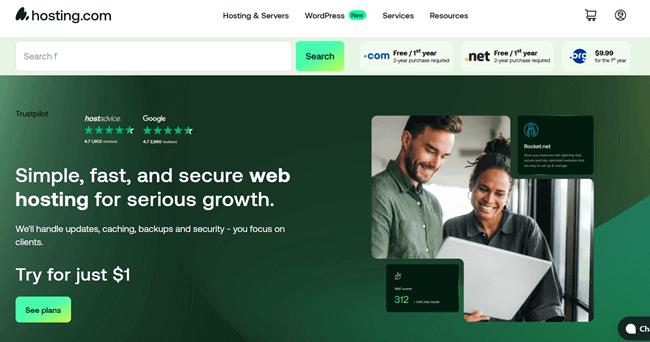
Hosting.com is a popular web hosting option for businesses, agencies, bloggers, and other website owners. Formerly known as A2 Hosting, the company supports several hosting types, including shared hosting, WordPress hosting, VPS hosting, dedicated servers, and reseller hosting.
NVMe storage, LiteSpeed web server technology, free migrations, daily backups, and free domain are main advantages of Hosting.cm plans.
You will get a cPanel or enhanced control panel on applicable hosting plans, to access website files, databases, email accounts, and domain settings through a familiar interface. The built-in firewall blocks hacking attempts, malware and suspicious bots automatically.
We already explained about NVMe hosting that helps you serve pages faster than other hosting types. Hosting combines NVMe storage with LiteSpeed caching and optimized MySQL to boost your page performance.
They have a 24/7 fast support and 30-day money back guarantee.
Ready to Launch Your Website?
Give your website a reliable home with Hosting.com. Explore its hosting plans and find the right fit for your project.
Explore Hosting.com Plans →Key Features of Hosting.com
What Is Hostinger?

Hostinger is a web hosting company that serves beginners, bloggers, small businesses, and developers worldwide. It offers shared hosting, WordPress hosting, cloud hosting, and VPS hosting, along with domain registration and website-building tools.
One of Hostinger’s main features is hPanel, its custom control panel for managing websites, domains, email accounts, and hosting settings. The company also offers AI-powered website creation tools, SSL certificates, automatic backups on eligible plans, and free CDN on selected packages.
NVMe storage, free domain, free migrations, and malware scanner are other advantages of Hostinger plans. However, basic plan users will get normal SSD storage only.
Hostinger is affordable for all budget types. They have 24/7 premium support and 30-day money back guarantee.
Ready to Build Your Website?
Get your website online with Hostinger. Explore its hosting plans, compare features, and find the right fit for your next project.
Explore Hostinger Plans →Key Features of Hostinger
Hosting.com vs Hostinger Review: Detailed Comparison
This detailed comparison looks at Hosting.com vs Hostinger across key areas, including storage technology, speed, pricing, features, security, and customer support. Let’s see how their hosting services compare and which provider offers better value for your website.
SSD or NVMe
Storage technology affects how quickly a hosting server reads website files and database data. Hosting.com uses NVMe SSD storage across all its web hosting plans, from shared hosting to dedicated server types. It also includes LiteSpeed caching, which helps deliver WordPress pages faster.
Hostinger offers both standard SSD and NVMe storage, depending on the plan. Its basic shared hosting plan (Premium) includes 20GB of SSD storage, while the Unlimited plan provides 50GB of NVMe storage.
Hosting.com has the advantage here: NVMe storage comes with all hosting plans, while Hostinger reserves NVMe storage for selected plans. Both providers use LiteSpeed technology on applicable hosting services. NVMe offers fast data access, but your website’s actual speed also depends on caching, server resources, site optimization, etc.
Daily Backups
Daily backups help protect your website if an update fails, files disappear, or a security issue damages your content. Hosting.com includes daily backups in all its web hosting plans, with off-server copies and restoration to a point within the previous 30 days.
Hostinger does not include daily backups with every hosting plan. Its entry-level Single and Premium plans include weekly backups, while higher-tier plans, such as Business and Cloud Startup, include daily backups. Users on eligible lower-tier plans may purchase daily backups as an add-on. Daily backups for VPS hosting also require a paid upgrade.
Hosting.com has the advantage here: daily backups come included with all hosting plans, while Hostinger restricts included daily backups to selected plans. You should also keep an independent backup copy as well, since no hosting provider guarantees complete data recovery in every situation.
Free Expert Migrations
Moving a website to a new host can involve files, databases, email accounts, and domain settings. Hosting.com offers free expert migration on all its advertised hosting plans, with its team handling website files, email, and domains. The service covers unlimited sites without a per-site migration fee.
Hostinger also offers free website migration across its hosting plans, including WordPress and other supported websites. Its migration team handles the transfer, though email services must be migrated separately. Some technical setups may require a manual transfer.
Both providers make switching hosts easier without charging a standard migration fee. Hosting.com provides hands-on migration of websites, email, and domains, while Hostinger offers a free migration service for eligible websites. Hosting.com has an edge for customers who want their email and domain migration handled alongside the website transfer.
Free Domain
A free domain helps you reduce the initial cost of launching a website. Hosting.com includes free domain registration for the first year with all hosting types including shared, WordPress, reseller, VPS, and dedicated plans
Hostinger also offers a free domain for one year with shared, VPS, and cloud hosting plans. However, this freebie may vary by country or region-based plans. For instance, they have a single site plan in certain regions like India. There is no free domain in this plan.
Performance
Hosting.com uses NVMe storage and LiteSpeed technology on all hosting plans. Its managed WordPress hosting also adds Cloudflare Enterprise CDN, free WP Rocket, and Object Cache Pro to improve performance. These tools help you cache pages, serve content closer to visitors, and reduce repeated database work.
Hostinger includes a free CDN with its shared hosting plans. Its Single and Premium plans list SSD storage (no CDN), while Unlimited and Cloud Startup include NVMe storage. Hostinger also uses LiteSpeed technology to enhance your user experience.
Verdict: Hosting.com stands out for managed WordPress hosting tools, while Hostinger provides CDN access across its selected shared hosting tiers. Hosting.com doesn’t give any free CDN in shared hosting type. Still, you can signup for a Cloudflare free plan and connect a CDN to your site.
Security
Hosting.com and Hostinger include security tools to protect websites from malware, suspicious traffic, and data loss. Hosting.com includes free SSL certificates, advanced malware protection, DDoS protection, a web application firewall, and daily off-server backups across its web hosting plans. Its backup service offers restoration to a point within the previous 30 days.
You can protect login pages brute force login protection and two factor authentication. Hosting.com also allows you to block users by country or IP address.Hotlink protection is another advantage, preventing other website owners use your images and thereby consume your bandwidth.
Hostinger provides free SSL certificates, malware scanning, firewall protection, and server monitoring. It also offers account protection features, including two-factor authentication on supported systems. However, daily backups are limited to selected plans.
Free Email Accounts
A professional email address using your domain helps your business look credible. Hosting.com includes custom-domain email accounts with allweb hosting plans. You can create addresses such as hello@yourdomain.com and access your messages through cPanel or Outlook or other supported email networks.
Hostinger also includes free email, but mailbox limits vary by plan. You will get one mailbox with Single, two mailboxes per website with Premium, and unlimited mailboxes per website with Unlimited. These mailboxes are free for the first year, after which you may need a paid email plan.
Verdict: Hosting.com includes custom-domain email with all hosting plans, while Hostinger’s free mailbox offer has a one-year limit on its current plans. If you want to keep business email costs predictable, compare mailbox storage, sending limits, and renewal charges before choosing a service.
Freebies
Hosting.com and Hostinger include several extras that help you launch and manage a website without buying separate tools. Hosting.com provides free SSL, free domain, and email accounts. Its managed WordPress hosting adds Cloudflare Enterprise CDN, WP Rocket, and Object Cache Pro at no extra plugin cost.
Hostinger includes free SSL, a CDN, AI website tools, and a free domain for one year on eligible plans. You will also get free email marketing tool, AI website builder, templates, and free Amazon affiliate marketing plugin in selected plans.
Control Panel and User Roles
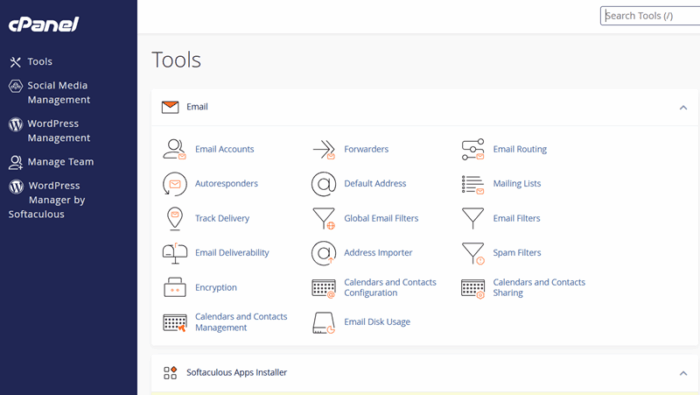
Hosting.com provides cPanel for managing websites, databases, email accounts, and hosting settings. Its multi-site management features also support bulk website management, multi-account switching, and role-based team access. Users can transfer website ownership and access a multi-language control panel. These features make Hosting.com worth considering for agencies, developers, and teams that manage several client websites.
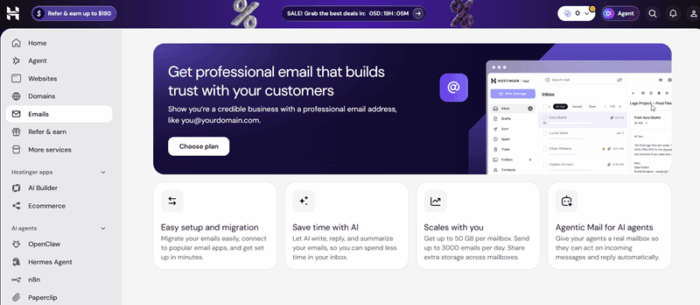
Hostinger uses its custom hPanel interface to manage websites, domains, and hosting resources. It also supports account sharing, allowing website owners to grant collaborators access without sharing their main login details. Available permissions depend on the assigned role.
Verdict: Hosting.com stands out for its bulk multi-site management, account switching, website ownership transfers, and multi-language control panel. Hostinger offers a straightforward dashboard and collaborator access for team workflows.
Pricing
Hosting.com’s Starter plan starts at $1.99 per month for 5 websites, while its Pro plan costs $3.49/mo and supports up to 10 websites with 50GB NVMe storage. The Max plan supports up to 50 websites with 100GB NVMe storage. It costs $7.79/mo.
Hostinger’s pricing starts at $2.49 per month, supporting three websites with 20GB SSD storage. Its Unlimited plan costs $3.49 per month and supports unlimited websites with 50GB NVMe storage.
Hosting.com supports all popular hosting types such as shared, managed wordpress, VPS, dedicated, reseller, AI application, and WooCommerce hosting. Hostinger offers shared, VPS, cloud, web apps, GPU, and agency hosting plans.
Online Reviews
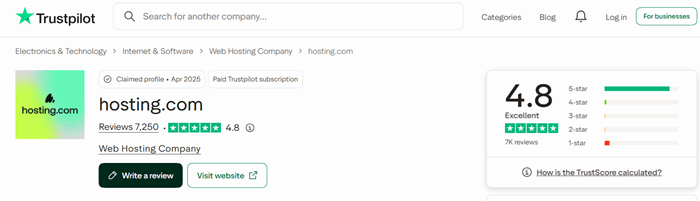
Customer reviews offer a glimpse into how Hosting.com and Hostinger handle support, billing, and website issues. On Trustpilot, Hosting.com has a 4.8 out of 5 rating from around 7,236 reviews, with 88% giving it five stars. Customers praise its support team for helping with technical problems, website setup, and migrations. Some customers report problems with technical support when dealing with complex hosting issues.

Hostinger has a 4.6 out of 5 rating from around 73,327 reviews, with 87% giving it five stars. Positive reviews highlight its easy-to-use control panel, helpful support staff, and website-building tools. Complaints include billing disputes, account recovery, and difficulty reaching human support.
Hosting.com has a slightly higher rating, while Hostinger has a much larger review base.
Server Locations
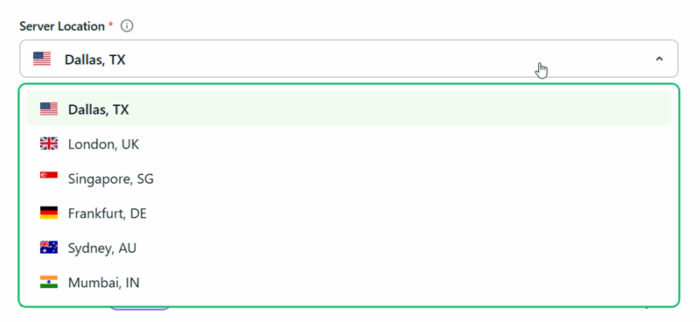
Hosting.com has data centers in the Dallas(USA), Singapore, London, Sydney, Mumbai (India), and Frankfurt (Denmark). These locations give website owners options across North America, Europe, Asia, and Australia. Hosting your website near its main audience helps you reduce network delays and improve response times.
Hostinger offers server locations across Europe, Asia, North America, and South America. Its listed locations include France, Germany, Lithuania, the Netherlands, the UK, India, Indonesia, Malaysia, the USA (Phoenix, Boston, and Asheville), and Brazil. The available locations depend on the hosting type.
Hostinger also offers free Cloudflare CDN integration on eligible hosting plans. Cloudflare’s network spans more than 330 cities across 125+ countries, helping deliver cached website content closer to visitors worldwide.
Verdict: Hostinger lists a broad range of server locations, while both providers can serve international visitors through CDN services. Choose a server region close to your main audience for the best starting point.
Customer Support
Hosting.com and Hostinger provide customer support for website setup, hosting errors, and account related issues. Hosting.com has 24/7 support through live chat, AI assistant (instant answers) and support tickets, with help for server problems, migrations, and website management. Its knowledge base also covers common hosting errors.
Hostinger provides 24/7 customer support through live chat, along with tutorials and guides in its Help Center. Its support team assists you with hosting settings, WordPress, domains, and technical issues.
Money-Back Guarantee
Hosting.com and Hostinger offer a 30-day money-back guarantee on eligible hosting purchases. Hosting.com covers new shared hosting, WordPress hosting, and reseller hosting plans. However, VPS and dedicated server plans are excluded from its standard guarantee. Domain registrations, renewals, SSL certificates, and certain third-party services are also non-refundable.
Hostinger’s 30-day guarantee covers eligible shared, cloud, and VPS hosting purchases, along with certain email services and upgrades. However, some products (eg, domain registration) and payment methods, including cryptocurrency payments, are excluded from this guarantee.
Verdict: Hostinger offers broader refund coverage for hosting types, including eligible VPS plans. Hosting.com’s standard guarantee focuses on shared, WordPress, and reseller hosting. Both providers require refund requests within the applicable period, so review the terms before ordering.
Conclusion
Choosing between Hosting.com and Hostinger comes down to your budget, website needs, and the features you value most. Both providers offer hosting plans for bloggers, businesses, WordPress users, and developers.
Hostinger is worth considering if you want an easy-to-use control panel, AI website tools, and affordable entry-level hosting. Its range of plans also gives you room to grow as your website attracts more visitors.
Hosting.com deserves a closer look if you want cPanel, daily backups, free expert migrations, and advanced tools for managed WordPress hosting. Its NVMe storage and additional performance features also appeal to website owners who value speed.
Before making your choice, compare renewal rates, server resources, backup policies, and support options. A low starting price means little if the renewal cost strains your budget.
Choose the host that fits your website today and supports its growth tomorrow.
Launch Your Website with Hostinger
Explore affordable hosting plans, an easy-to-use control panel, and AI website-building tools.
Explore Hostinger Plans →Ready for Faster WordPress Hosting?
Get NVMe storage, daily backups, and expert migration support with Hosting.com.
Explore Hosting.com →